# TAA
TAA 原理是通过 Motion Vector,找到上一帧的当前像素点的信息,然后混合,因为上一帧信息有很大概率还会出现在屏幕内。同时,对投影矩阵使用 noise 进行半个像素距离的偏移,使得每一帧的投影矩阵与上一帧都不一样,也就相当于混合了多次采样的结果,实现超级采样。
在采样的时候可以用周围 8 格,此时要是上一帧的投影矩阵 projection 到当前帧 uv 是在屏幕外面的话,可以用模糊
1
2
3
4
5
6
7
8
9
10
11
12
13
14
15
16
17
18
| float3filter(float3samples[9])
{
#if _TAA_UseBlurSharpenFilter
const float k_blur0 = 0.6915221;
const float k_blur1 = 0.07002799;
const float k_blur2 = 0.007091487;
float3 blur_color = (samples[0] + samples[2] + samples[6] + samples[8]) * k_blur2 +
(samples[1] + samples[3] + samples[5] + samples[7]) * k_blur1 +
samples[4] * k_blur0;
float3 avg_color = (samples[0] + samples[1] + samples[2]
+ samples[3] + samples[4] + samples[5]
+ samples[6] + samples[7] + samples[8]) / 9;
float3 sharp_color = blur_color + (blur_color - avg_color) * _TAA_Sharp * 3;
return sharp_color;
#else
return samples[4];
#endif
}
|
同时在采样历史帧的时候可以用 Bicubic2DCatmullRom 曲线
1
2
3
4
5
6
7
8
9
10
11
12
13
14
15
16
17
18
19
20
21
22
23
24
25
26
27
28
29
30
31
32
33
34
35
36
37
38
39
40
41
42
43
44
45
46
47
48
49
50
51
| float3sample_taa_tex(float2uv)
{
float2 samplePos = uv * _TAA_Texture_TexelSize.zw;
float2 tc1 = floor(samplePos - 0.5) + 0.5;
float2 f = samplePos - tc1;
float2 f2 = f * f;
float2 f3 = f * f2;
const float c = _TAA_PrevSharp;
float2 w0 = -c * f3 + 2.0 * c * f2 - c * f;
float2 w1 = (2.0 - c) * f3 - (3.0 - c) * f2 + 1.0;
float2 w2 = -(2.0 - c) * f3 + (3.0 - 2.0 * c) * f2 + c * f;
float2 w3 = c * f3 - c * f2;
float2 w12 = w1 + w2;
float2 tc0 = _TAA_Texture_TexelSize.xy * (tc1 - 1.0);
float2 tc3 = _TAA_Texture_TexelSize.xy * (tc1 + 2.0);
float2 tc12 = _TAA_Texture_TexelSize.xy * (tc1 + w2 / w12);
float3 s0 = SAMPLE_TEXTURE2D_X(_TAA_Texture, sampler_LinearClamp, float2(tc12.x, tc0.y)).rgb;
float3 s1 = SAMPLE_TEXTURE2D_X(_TAA_Texture, sampler_LinearClamp, float2(tc0.x, tc12.y)).rgb;
float3 s2 = SAMPLE_TEXTURE2D_X(_TAA_Texture, sampler_LinearClamp, float2(tc12.x, tc12.y)).rgb;
float3 s3 = SAMPLE_TEXTURE2D_X(_TAA_Texture, sampler_LinearClamp, float2(tc3.x, tc0.y)).rgb;
float3 s4 = SAMPLE_TEXTURE2D_X(_TAA_Texture, sampler_LinearClamp, float2(tc12.x, tc3.y)).rgb;
float cw0 = (w12.x * w0.y);
float cw1 = (w0.x * w12.y);
float cw2 = (w12.x * w12.y);
float cw3 = (w3.x * w12.y);
float cw4 = (w12.x * w3.y);
float3 min_color = min(s0, min(s1, s2));
min_color = min(min_color, min(s3, s4));
float3 max_color = max(s0, max(s1, s2));
max_color = max(max_color, max(s3, s4));
s0 *= cw0;
s1 *= cw1;
s2 *= cw2;
s3 *= cw3;
s4 *= cw4;
float3 historyFiltered = s0 + s1 + s2 + s3 + s4;
float weightSum = cw0 + cw1 + cw2 + cw3 + cw4;
float3 filteredVal = historyFiltered * rcp(weightSum);
return clamp(filteredVal, min_color, max_color);
|
# VarianceClipping
用周围 9 个像素的平均颜色求出当前像素颜色 max/min 像素,把历史帧限制在像素里面可以防止鬼影出现
1
2
3
4
5
6
7
8
9
10
| float3 m1 = color[0] + color[1] + color[2]
+ color[3] + color[4] + color[5]
+ color[6] + color[7] + color[8];
float3 m2 = color[0] * color[0] + color[1] * color[1] + color[2] * color[2]
+ color[3] * color[3] + color[4] * color[4] + color[5] * color[5]
+ color[6] * color[6] + color[7] * color[7] + color[8] * color[8];
float3 mu = m1 / 9;
float3 sigma = sqrt(abs(m2 / 9 - mu * mu));
min_color = mu - 1.5 * sigma;
max_color = mu + 1.5 * sigma;
|
也可以用单个像素 clipping,与 motion vector 关联,越大 offset 越远
1
2
3
4
5
6
7
8
9
10
11
12
13
14
15
16
17
18
19
20
21
22
23
24
25
26
27
| void minmax_4tap(float2uv,float2mv, float depth, outfloat3min_color, outfloat3max_color)
{
const float _SubpixelThreshold = 0.5;
const float _GatherBase = 0.5;
const float _GatherSubpixelMotion = 0.1666;
float2texel_vel = mv / _SourceTex_TexelSize.xy;
float texel_vel_mag = length(texel_vel) * depth;
float k_subpixel_motion = saturate(_SubpixelThreshold / (FLT_EPS + texel_vel_mag));
float k_min_max_support = _GatherBase + _GatherSubpixelMotion * k_subpixel_motion;
float2ss_offset01 = k_min_max_support *float2(-_SourceTex_TexelSize.x, _SourceTex_TexelSize.y);
float2ss_offset11 = k_min_max_support *float2(_SourceTex_TexelSize.x, _SourceTex_TexelSize.y);
float3c00 = SAMPLE_TEXTURE2D_X(_SourceTex,sampler_LinearClamp, uv - ss_offset11).rgb;
float3c10 = SAMPLE_TEXTURE2D_X(_SourceTex,sampler_LinearClamp, uv - ss_offset01).rgb;
float3c01 = SAMPLE_TEXTURE2D_X(_SourceTex,sampler_LinearClamp, uv + ss_offset01).rgb;
float3c11 = SAMPLE_TEXTURE2D_X(_SourceTex,sampler_LinearClamp, uv + ss_offset11).rgb;
#if _TAA_UseYCoCgSpace
c00 = RGBToYCoCg(c00);
c10 = RGBToYCoCg(c10);
c01 = RGBToYCoCg(c01);
c11 = RGBToYCoCg(c11);
#endif
min_color = min(c00, min(c10, min(c01, c11)));
max_color = max(c00, max(c10, max(c01, c11)));
}
|
# AABBClip
利用刚刚得出的 Max/Min 求出 aabb 然后把颜色 clip 在里面
1
2
3
4
5
6
7
8
9
10
11
12
13
14
15
16
17
| float3clip_color(float3min_color,float3max_color,float3color)
{
float3 p_clip = 0.5 * (max_color + min_color);
float3 e_clip = 0.5 * (max_color - min_color) + FLT_EPS;
float3 v_clip = color - p_clip;
float3 v_unit = v_clip / e_clip;
float3 a_unit = abs(v_unit);
float ma_unit = max(a_unit.x, max(a_unit.y, a_unit.z));
if (ma_unit > 1.0)
return p_clip + v_clip / ma_unit;
else
return color;
}
|
# YCoCg
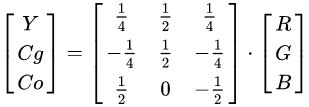
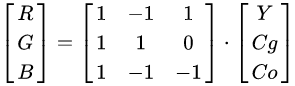
YCoCg 色彩模型是通过将关联的 RGB 色彩空间简单转换为亮度值(表示为 Y)和称为色度绿色(Cg)和色度橙色(Co)的两个色度值形成的色彩空间。 它支持视频和图像压缩设计,例如 H.264 / MPEG-4 AVC,HEVC,JPEG XR 和 Dirac,因为它计算简单,具有良好的变换编码增益,并且可以无损地转换 RGB 和 RGB 比其他颜色模型需要的位数少。
属性 YCoCg 色彩模型优于 YCbCr 色彩模型的优点是更简单快速的计算,更好的颜色平面解相关以提高压缩性能,以及完全无损的可逆性。
再 TAA 中 AABB 有时会在 RGB 空间上产生一个很大矩形区域,从而在某些情况下 clamp 得到历史像素偏差过大。一个更好的方法是使用沿亮度方向的 OBB 作为约束范围,这可以通过将像素色彩转换到 YCoCg 色彩空间下使用 AABB 来实现。
![Untitled]()
![Untitled]()
在 UE 会乘四倍,可能是为了避免小数出现
1
2
3
4
5
6
7
8
9
10
11
12
13
14
15
16
17
18
19
20
21
22
23
| float3RGBToYCoCg(float3RGB )
{
float Y = dot( RGB,float3( 1, 2, 1 ) );
float Co = dot( RGB,float3( 2, 0, -2 ) );
float Cg = dot( RGB,float3( -1, 2, -1 ) );
float3YCoCg =float3( Y, Co, Cg );
return YCoCg;
}
float3YCoCgToRGB(float3YCoCg )
{
float Y = YCoCg.x * 0.25;
float Co = YCoCg.y * 0.25;
float Cg = YCoCg.z * 0.25;
float R = Y + Co - Cg;
float G = Y + Cg;
float B = Y - Co - Cg;
float3RGB =float3( R, G, B );
return RGB;
}
|